Input processing
Inputs hold the latest value from a device. Input processing runs a list of steps on each new value, and can scale, combine or convert it and log the result to feeds. Virtual feeds use the same process lists, run when the feed is read.
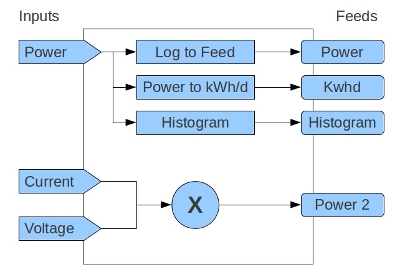
For the user view, see Inputs in the user guide.
Flow
Data arrives at
input/postorinput/bulk, or from MQTT throughscripts/services/emoncms_mqtt.Modules/input/input_methods.phpfinds or creates each input for the node and key, and stores its value and time. With Redis enabled, inputs are held in Redis.For each input with a process list, it calls
Process::input($time, $value, $processList, $options)inModules/process/process_model.php.input()runs the steps in order. Each step receives the value returned by the step before.
For a virtual feed, the feed engine Modules/feed/engine/VirtualFeed.php calls input() once for each datapoint it returns, with $options['sourcetype'] set to ProcessOriginType::VIRTUALFEED.
Process list format
Stored format
Process lists are stored as a string in the processList column of the input and feeds tables:
key:arg,key:arg,...
keyis a process key such asprocess__log_to_feed, or a numeric id for processes that have anid_num, for example1for Log to feed.A process with several arguments has them separated by
:, for examplekey:arg1:arg2.Processes without an argument have an empty argument, for example
key:.
Example, log to feed 12 and write kWh to feed 13:
1:12,4:13
Numeric ids are kept for compatibility. process_map in Process maps them to keys.
API format
The API takes and returns process lists as JSON:
[
    { "fn": "process__log_to_feed", "args": [12] },
    { "fn": "process__power_to_kwh", "args": [13] }
]
Set a list with a POST:
POST input/process/set.json?inputid=5        processlist=<JSON>
POST feed/process/set.json?id=20             processlist=<JSON>   (virtual feeds)
Process::validate_processlist() checks each step: the process exists and is allowed in this context, and each argument has the right type and belongs to the user. encode_processlist() and decode_processlist() convert between the two formats.
Process definitions
Core processes are defined in Modules/process/process_processlist.php. Each entry:
Field |
Meaning |
|---|---|
|
Numeric id used in stored lists. Core processes only |
|
Label in the process list dialog, wrapped in |
|
Badge text on the inputs page |
|
|
|
Method that runs the step |
|
Group in the process dropdown |
|
Feed engines allowed when creating a feed from this process |
|
Needs Redis |
|
Allowed in input process lists |
|
Allowed in virtual feed process lists |
|
Help text in the dialog, HTML |
args can replace argtype for a process with several arguments. convert_arg_structure() turns argtype into a one-item args array.
Process functions
A process function has this signature:
public function scale($arg, $time, $value, $options = null)
{
    if ($value === null) return $value;
    return $value * $arg;
}
$arg: the argument, or an array for several arguments.$time: the input time.$value: the value from the step before.$options: context, includingsourcetypeandsourceid.
Return the value to pass to the next step. A process that only logs returns $value unchanged.
Flow control:
proc_skip_next = trueskips the next step. Used by the conditional processes.proc_gotojumps to a step. A list that runs more than twice its length is stopped and marked withprocess__error_found.proc_initialvalueholds the input value from the start of the list. Reset to Original returns it.
Adding processes from a module
A module can add processes in Modules/<module>/<module>_processlist.php, with a class named <Module>_ProcessList:
class Mymodule_ProcessList
{
    public function __construct($parent) { }

    public function process_list()
    {
        return array(
            array(
                "name" => tr("My process"),
                "short" => "myp",
                "argtype" => ProcessArg::VALUE,
                "function" => "my_process",
                "group" => tr("My module"),
                "input_context" => true,
                "virtual_feed_context" => true,
                "description" => tr("<p>What it does.</p>")
            )
        );
    }

    public function my_process($arg, $time, $value, $options = null)
    {
        return $value;
    }
}
The key is <module>__<function>, for example mymodule__my_process. Process loads every module’s process list when it starts. See Modules/schedule/schedule_processlist.php.
Performance
Input processing runs for every value received, so it must be fast:
Keep database queries out of process functions where possible. Input and feed metadata are cached in Redis.
Feed writes go through the storage engine. With the low-write setting they are buffered in Redis and written by
feedwriter.Processes that read the last value of another input or feed use the cached value, not a query.
History
Input processing was rebuilt in March 2013 to reduce database queries, and Redis caching was added in November 2013. See Improving emoncms performance with Redis.