Troubleshooting
Start with the community forum FAQ.
Inputs or feeds not updating
Check the services
Go to Setup > Admin > System Info and check the Services list. emonhub, emoncms_mqtt, feedwriter, redis-server and mosquitto should all show Active and running.
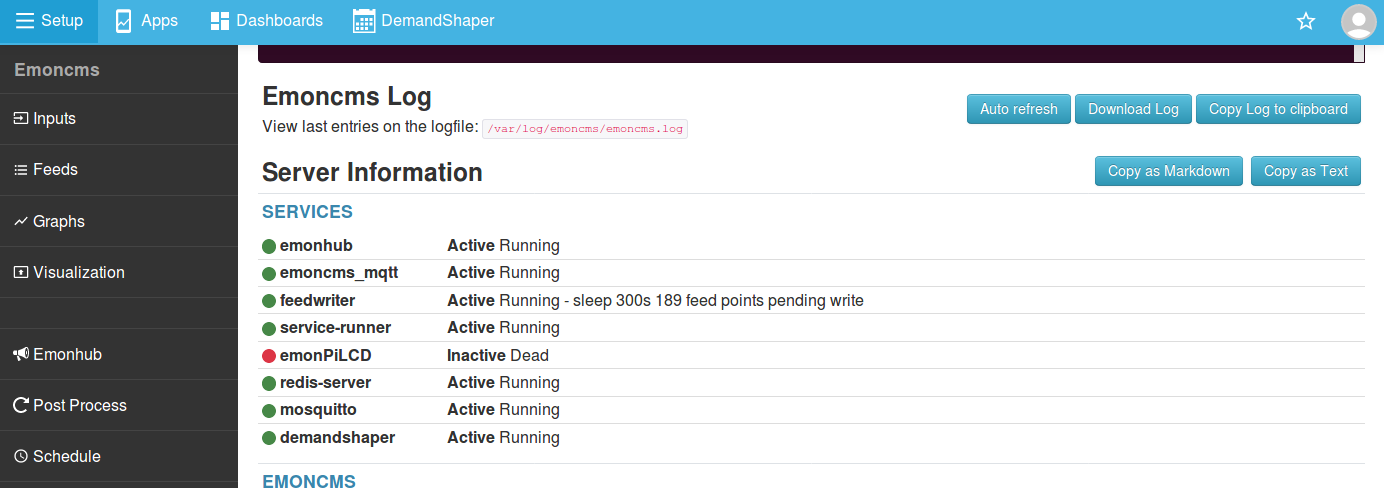
To check a service via SSH:
sudo systemctl status emoncms_mqtt
Common causes of a stopped service:
Incorrect configuration or installation.
A full
/tmpor/var/logpartition.SD card corruption after a power cut.
emoncms_mqtt and feedwriter depend on redis-server. emonhub and emoncms_mqtt depend on mosquitto.
Services running but no inputs
Check the log at Setup > EmonHub:
No
NEW FRAMElines means emonHub receives no data from the radio or the measurement board. Check the hardware and the radio settings in emonhub.conf. Click Edit config on the EmonHub page.NEW FRAMElines but noMQTT Publishing:lines means a problem with the MQTT interfacer. Compare it with the default emonhub.conf.
See emonHub troubleshooting for an example of a working log and how to read it.
emonHub not running
Check the log at Setup > EmonHub. A common cause is an error in emonhub.conf. Check it against the default emonhub.conf.
Emoncms MQTT service not running
Check Setup > Admin > Emoncms Log, or via SSH:
tail /var/log/emoncms/emoncms.log
A common cause is a problem with MySQL, Redis or Mosquitto. Try a reboot.
Ask for help
Post on the community forum. Include any errors from the logs and the server information from Setup > Admin > System Info. Click Copy as Markdown and paste the result into your post.
Disk space
Check free space in the Disk section of Setup > Admin > System Info. The data partition is /var/opt/emoncms.
If a partition is full, ask for help on the forum as above.
Incorrect system time
The emonPi and emonBase must have the correct time, set to UTC. They get the time from an NTP server, so they need an internet connection at boot. For long periods without internet, add a hardware real time clock.
On the emonPi, press the LCD button until the uptime page shows the time.
To check the time via SSH:
timedatectl
System clock synchronized: yes shows that the time is set from NTP.
Force a time update
Check that the emonPi or emonBase has an internet connection.
Reboot.
If the time is still wrong, connect via SSH (credentials) and restart the time service:
sudo systemctl restart systemd-timesyncd
Run
timedatectlagain to check.
Set the Emoncms timezone
The system time is UTC. Emoncms applies your timezone separately. To set it, go to Setup > My Account and change Timezone.
Vrms reads twice the expected value
In North America, see Use in North America. Step 3 covers software calibration.
Reset a local password
Connect via SSH (credentials) and run:
php /opt/emoncms/modules/usefulscripts/resetpassword.php
Enter the user id (default 1), then a new password or press enter to generate one:
=======================================
EMONCMS PASSWORD RESET
=======================================
Select userid, or press enter for default:
Using default user 1
Enter new password, or press enter to auto generate:
Auto generated password: 9f7599c8da
If you have also forgotten the username, list the users in the database. Enter the MySQL password when prompted (credentials):
mysql -u emoncms -p emoncms -e "SELECT id, username, email FROM users;"
Factory reset
Warning
A factory reset deletes all Emoncms data.
sudo /opt/openenergymonitor/EmonScripts/other/factoryreset
sudo reboot